买服务器上雨云
 由超大带宽雨云提供赞助
Understand the syntax to better work with the tools to complete the development process.
<div class="items">
  <a class="item" id="1">
    first item
  </a>
  <span class="item" id="2">
    second item
  </span>
  <li class="item" id="3" data-id="123">
    third item
  </li>
</div>
div a span li: Generic container labelsclass id data-id: Attribute class: Element provide class nameid: Element provide a unique identifierdata-id: Element provide custom data<div class="items"><a class="item">// Variable
var name = "zy"; // Global variable, can be defined repeatedly, can be assigned repeatedly.
let age = 25; // Local variable, cannot be defined repeatedly, can be assigned repeatedly.
const PI = 3.14; // Local variable, non-repeatable definitions, non-repeatable assignments
// Data type
typeof 123; // number
typeof "123"; // string
typeof true; // boolean
typeof null; // object
typeof undefined; // undefined
typeof { name: "zy" }; // object
typeof [1, 2, 3]; // object
typeof function () {}; // function
// Operator
let a = 5;
let b = 2;
console.log(a + b); // Addition Output: 7
console.log(a - b); // Subtraction Output: 3
console.log(a * b); // Multiplication Output: 10
console.log(a / b); // Division Output: 2.5
console.log(a % b); // Balance Output: 1
console.log(a ** b); // Power Operations Output: 25
// Comparison operator
// Double equals sign will convert to number before judgment, triple equals sign will additionally judge the data type
console.log(a == b); // equal Output: false
console.log(a != b); // ne Output: true
console.log(a > b); // gt Output: true
console.log(a < b); // lt than Output: false
console.log(a >= b); // ge Output: true
console.log(a <= b); // le Output: false
// String
let str = "Hello World!";
console.log(str.length); // Length Output: 12
console.log(str.indexOf("World")); // Find first letter subscript Output: 6
console.log(str.slice(6, 11)); // Intercept string (start position, length) Output: World
console.log(str.replace("World", "zy")); // Replace string Output: Hello zy!
console.log(str.toUpperCase()); // Capitalize Output: HELLO WORLD!
console.log(str.toLowerCase()); // Lowercase Output: hello world!
console.log(str.split(" ")); // Splite Output: ["Hello", "World!"]
// Array
let cars = ["BMW", "Volvo", "Saab"];
console.log(cars.length); // Length Output: 3
console.log(cars[0]); // Accessing first element Output: BMW
cars.push("Audi"); // Add elements to end of array Output: ["BMW", "Volvo", "Saab", "Audi"]
cars.pop(); // Delete last element of array Output: ["BMW", "Volvo", "Saab"]
cars.shift(); // Delete first element of array Output: ["Volvo", "Saab"]
cars.unshift("Audi"); // Adds an element to first element of array Output: ["Audi", "Volvo", "Saab"]
// Object
let person = { name: "zy", age: 25, city: "Shanghai" };
console.log(person.name); // Access object properties Output: zy
person.age = 26; // Modify object attribute value Output: { name: "zy", age: 26, city: "Shanghai" }
delete person.city; // Delete object attributes Output: { name: "zy", age: 26 }
// Function
function sayHello() {
console.log("Hello World!");
}
sayHello(); // Output: Hello World!
function add(a, b) {
return a + b;
}
console.log(add(3, 5)); // Output: 8
// Conditional statements
let age = 25;
if (age >= 18) {
console.log("Adult");
} else if (age >= 12) {
console.log("Teenager");
} else {
console.log("Children");
} // Output: Adult
// Circular statements
for (let i = 0; i < 5; i++) {
console.log(i);
} // Output: 0 1 2 3 4
// Exception handling
try {
throw "An error!";
} catch (error) {
console.log(error);
} // Output: An error!const cheerio = require('cheerio');
const html = `
<div id="container">
<ul class="list">
<li class="item-0">first item</li>
</ul>
</div>
`;
const $ = cheerio.load(html);
console.log($('#container .list li').text()); // Output the content of nested <li> elements
// Output
// first itemconst cheerio = require('cheerio');
const html = `
<div id="container">
<ul class="list">
<li class="item-0">first item</li>
<li class="item-1"><a href="link2.html">second item</a></li>
<div class="item-2 active"><a href="link3.html"><span class="bold">third item</span></a></div>
</ul>
</div>
`;
const $ = cheerio.load(html);
const items = $('.list');
// Find all <li> children
items.find('li').each((index, element) => console.log($(element).html()));
// Find all child elements
items.children().each((index, element) => console.log($(element).html()));
// Finds all elements with class="active" in their children.
items.children('.active').each((index, element) => console.log($(element).html()));
// Find the second child element
items.children().eq(1).each((index, element) => console.log($(element).html()));
// Output
// first item
// <a href="link2.html">second item</a>
// first item
// <a href="link2.html">second item</a>
// <a href="link3.html"><span class="bold">third item</span></a>
// <a href="link3.html"><span class="bold">third item</span></a>
// <a href="link2.html">second item</a>const cheerio = require('cheerio');
const html = `
<div id="container">
<ul class="list">
<li class="item-0">first item</li>
<li class="item-1"><a href="link2.html">second item</a></li>
<li class="item-2 active"><a href="link3.html"><span class="bold">third item</span></a></li>
<li class="item-3 active"><a href="link4.html">fourth item</a></li>
<li class="item-4"><a href="link5.html">fifth item</a></li>
</ul>
</div>
`;
const $ = cheerio.load(html);
const items = $('.list');
console.log(items.parent().html()); // Find parent element
// Output
// <div id="container">
// <ul class="list">
// <li class="item-0">first item</li>
// <li class="item-1"><a href="link2.html">second item</a></li>
// <li class="item-2 active"><a href="link3.html"><span class="bold">third item</span></a></li>
// <li class="item-3 active"><a href="link4.html">fourth item</a></li>
// <li class="item-4"><a href="link5.html">fifth item</a></li>
// </ul>
// </div>const cheerio = require('cheerio');
const html = `
<div class="wrap">
<div id="container">
<ul class="list">
<li class="item-0">first item</li>
<li class="item-1"><a href="link2.html">second item</a></li>
<li class="item-2 active"><a href="link3.html"><span class="bold">third item</span></a></li>
<li class="item-3 active"><a href="link4.html">fourth item</a></li>
<li class="item-4"><a href="link5.html">fifth item</a></li>
</ul>
</div>
</div>
`;
const $ = cheerio.load(html);
const items = $('.list');
console.log(items.parents().html()); // Find all ancestral elements
console.log(items.parents('.wrap').html()); // Finds ancestor elements with class="wrap"
// Output
// <ul class="list">
// <li class="item-0">first item</li>
// <li class="item-1"><a href="link2.html">second item</a></li>
// <li class="item-2 active"><a href="link3.html"><span class="bold">third item</span></a></li>
// <li class="item-3 active"><a href="link4.html">fourth item</a></li>
// <li class="item-4"><a href="link5.html">fifth item</a></li>
// </ul>
// <div class="wrap">
// <div id="container">
// <ul class="list">
// <li class="item-0">first item</li>
// <li class="item-1"><a href="link2.html">second item</a></li>
// <li class="item-2 active"><a href="link3.html"><span class="bold">third item</span></a></li>
// <li class="item-3 active"><a href="link4.html">fourth item</a></li>
// <li class="item-4"><a href="link5.html">fifth item</a></li>
// </ul>
// </div>
// </div>const cheerio = require('cheerio');
const html = `
<div class="wrap">
<div id="container">
<ul class="list">
<li class="item-0">first item</li>
<li class="item-1"><a href="link2.html">second item</a></li>
<li class="item-2 active"><a href="link3.html"><span class="bold">third item</span></a></li>
<li class="item-3 active"><a href="link4.html">fourth item</a></li>
<li class="item-4"><a href="link5.html">fifth item</a></li>
</ul>
</div>
</div>
`;
const $ = cheerio.load(html);
const li = $('.list .item-2.active');
// Find all sibling elements
li.siblings().each((index, element) => console.log($(element).html()));
// Find the brother element with class="active"
li.siblings('.active').each((index, element) => console.log($(element).html()));
// Output
// first item
// <a href="link2.html">second item</a>
// <a href="link4.html">fourth item</a>
// <a href="link5.html">fifth item</a>
// <a href="link4.html">fourth item</a>const cheerio = require('cheerio');
const html = `
<div class="wrap">
<div id="container">
<ul class="list">
<li class="item-0">first item</li>
<li class="item-1"><a href="link2.html">second item</a></li>
<li class="item-2 active"><a href="link3.html"><span class="bold">third item</span></a></li>
<li class="item-3 active"><a href="link4.html">fourth item</a></li>
<li class="item-4"><a href="link5.html">fifth item</a></li>
</ul>
</div>
</div>
`;
const $ = cheerio.load(html);
$('.list li').each((index, element) => {
console.log($(element).html()); // Traverse all <li> elements
});
// Output
// first item
// <a href="link2.html">second item</a>
// <a href="link3.html"><span class="bold">third item</span></a>
// <a href="link4.html">fourth item</a>
// <a href="link5.html">fifth item</a>const cheerio = require('cheerio');
const html = `
<div class="wrap">
<div id="container">
<ul class="list">
<li class="item-0">first item</li>
<li class="item-1"><a href="link2.html">second item</a></li>
<li class="item-2 active"><a href="link3.html">fourth-item<i>123</i><font>456</font></a></li>
<li class="item-3 active"><a href="link4.html"><span class="bold">third item</span></a></li>
<li class="item-4"><a href="link5.html">fifth item</a></li>
</ul>
</div>
</div>
`;
const $ = cheerio.load(html);
const a = $('.item-2.active a');
console.log(a.attr('href')); // Get attribute value
console.log(a.text()); // Get text content
console.log(a.contents().filter(function () {
return this.nodeType === 3; // Filter text node
}).text()); // Get plain text content, excluding child elements
console.log(a.clone().find('font').remove().end().text()); // Get text content after removing the <font> element
console.log(a.html()); // Get internal HTML content
console.log(a.prop('outerHTML')); // Get outer HTML content
// Output
// link3.html
// fourth-item123456
// fourth-item
// fourth-item123
// fourth-item<i>123</i><font>456</font>
// <a href="link3.html">fourth-item<i>123</i><font>456</font></a>const html = `
<div class="wrap">
<div id="container">
<ul class="list">
<li class="item-0">first item</li>
<li class="item-1"><a href="link2.html">second item</a></li>
<li class="item-2 active"><a href="link3.html">fourth-item<i>123</i><font>456</font></a></li>
<li class="item-3 active"><a href="link4.html"><span class="bold">third item</span></a></li>
<li class="item-4"><a href="link5.html">fifth item</a></li>
</ul>
</div>
</div>
`;
console.log(pdfh(html, '.item-2 a&&href')); // get attribute value href
console.log(pdfh(html, '.item-2&&Text')); // get text content Text
console.log(pdfh(html, '.item-2--i--font&&Text')); // get plain text content, exclude <i> and <font >sub-elements
console.log(pdfh(html, '.item-2--font&&Text')); // gettext after removing the <font> element
console.log(pdfh(html, '.item-2 a')); // get internal HTML content
console.log(pdfh(html, '.item-2')); // get outer HTML content
// Output
// link3.html
// fourth-item123456
// fourth-item
// fourth-item123
// <a href="link3.html">fourth-item<i>123</i><font>456</font></a>
// <li class="item-2 active"><a href="link3.html">fourth-item<i>123</i><font>456</font></a></li>const html = `
<div class="wrap">
<div id="container">
<ul class="list">
<li class="item-0">first item</li>
<li class="item-1"><a href="link2.html">second item</a></li>
<li class="item-2 active"><a href="link3.html">fourth-item<i>123</i><font>456</font></a></li>
<li class="item-3 active"><a href="link4.html"><span class="bold">third item</span></a></li>
<li class="item-4"><a href="link5.html">fifth item</a></li>
</ul>
</div>
</div>
`;
console.log(pdfa(html, '#container ul.list li')); // Get all the li elements
// Output
[
"<li class="item-0">first item</li>",
"<li class="item-1"><a href="link2.html">second item</a></li>",
"<li class="item-2 active"><a href="link3.html">fourth-item<i>123</i><font>456</font></a></li>",
"<li class="item-3 active"><a href="link4.html"><span class="bold">third item</span></a></li>",
"<li class="item-4"><a href="link5.html">fifth item</a></li>"
]Inject sandbox utilsSanbox drpySanbox drpyCustomSanbox libsSanbox
The following is an example of
Cherry Studio
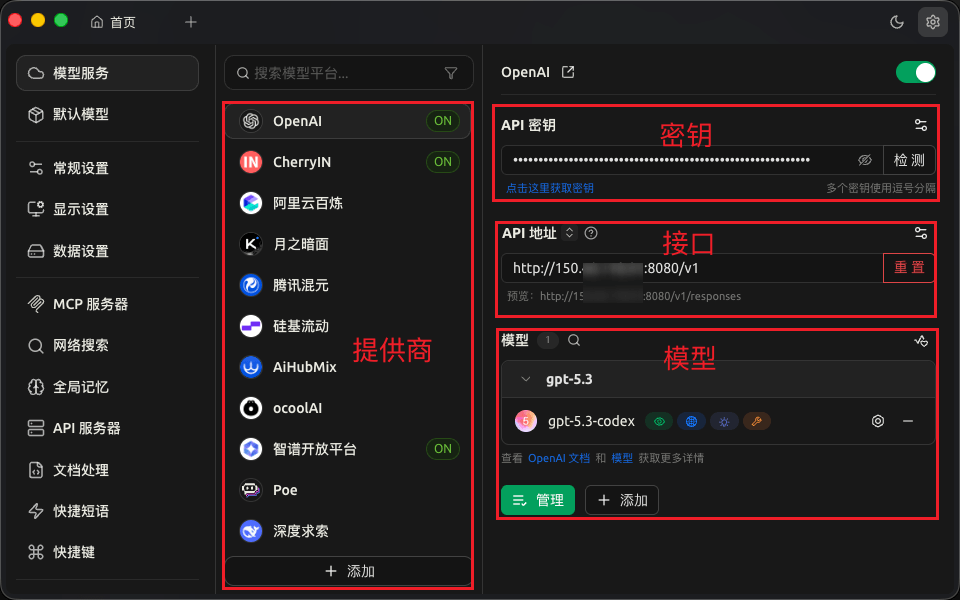
Config AI model: Document
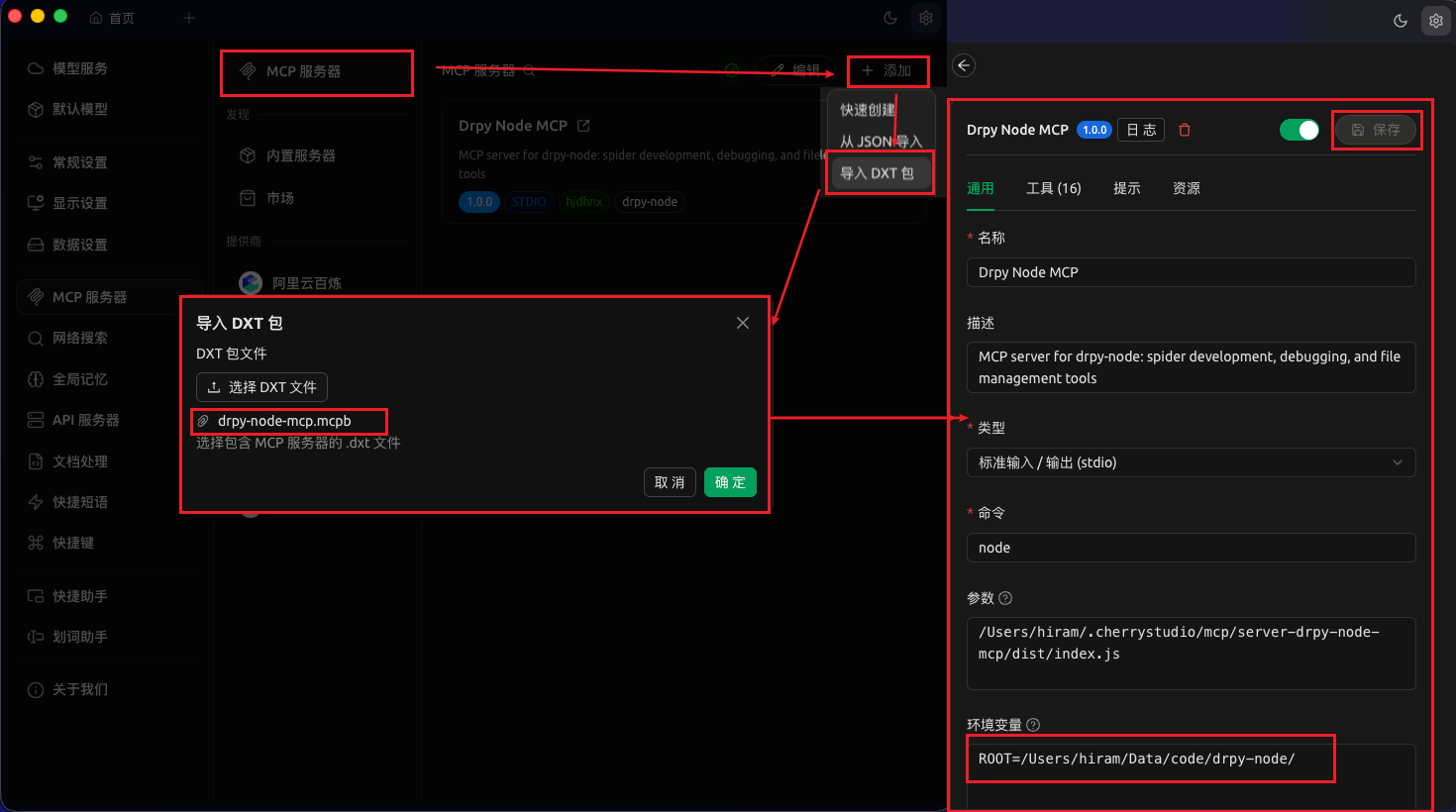
Config MCP: Document
Verify
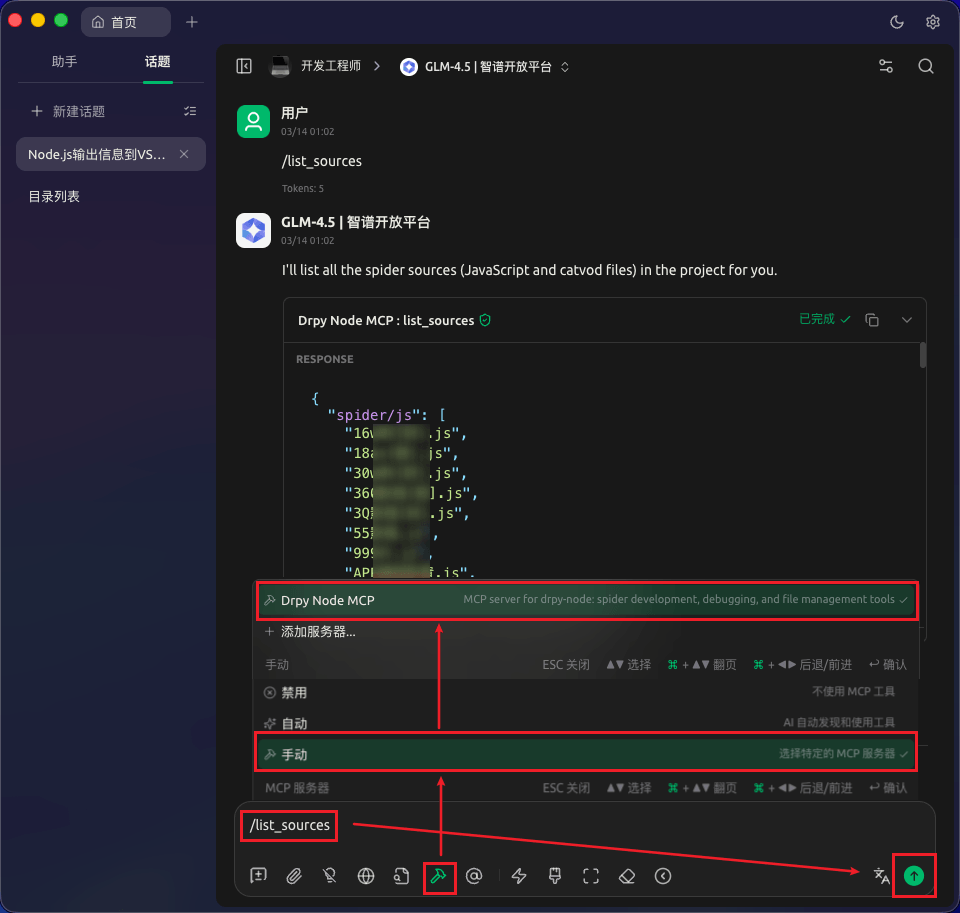
🔨->Manual->Drpy Node MCP(Select green)->Send /list_sources